
A school yearbook is more than a collection of photographs. It brings together the people, achievements and experiences that made the school year memorable. From classroom activities and sporting events to excursions, performances and graduation celebrations, it gives students, teachers and families something to look back on long after the year has ended.
Creating a yearbook, however, takes more than putting photographs into a layout. Schools need to organise content, collect images, choose the right format, prepare artwork and arrange printing within a set timeframe.
Whether you are producing a yearbook for a primary school, secondary school or graduating class, a little planning can make the process much easier. Here are some practical considerations to help you create a school yearbook that looks professional and captures the character of your school community.
Start Planning Your School Yearbook Early
The best time to plan a school yearbook is well before the end of the academic year. Waiting until the final weeks can make it difficult to collect photographs, confirm student details and get approval for the finished design.
Start by deciding what the yearbook should include and who will be responsible for each part of the project. A teacher, school administrator or small yearbook committee can coordinate the work and keep everything moving.
Think about the content you want to feature, such as:
- Class photographs and student profiles
- Messages from the principal and teaching staff
- School events, excursions and celebrations
- Sports teams, competitions and achievements
- Student artwork and classroom projects
- Graduation photographs and messages
- Highlights from the academic year
You do not have to include every activity that took place. Choose the moments that best represent the year and give each section enough space to tell its story.
It is also worth setting deadlines for collecting photographs, submitting written content, completing the design and approving the final proof. This gives everyone a clear idea of what needs to be done and when.
Organise Photographs and Content Before Designing
Collecting content from different classes and departments can be one of the most time-consuming parts of yearbook production. A little organisation at the beginning can save plenty of time later.
Create shared folders for photographs, written contributions and other materials. Label them by class, year level or event so that images are easy to identify when the design work begins.
Ask teachers and contributors to provide captions and relevant details with their photographs. This is particularly useful for group pictures, sports events and school celebrations where names and dates may not be obvious.
Image quality deserves attention too. A photograph that looks clear on a phone may not be suitable for a full-page print layout. Where possible, collect the original high-resolution image rather than a compressed version shared through a messaging app.
Remember to check the school’s photography permissions before including student images. Confirming this early helps avoid having to remove photographs once the yearbook has been designed.
Choose the Right Yearbook Size and Format
The size of your yearbook affects how the content is presented, how photographs appear and how comfortable the finished publication is to handle.
A4 is a practical option for schools that want plenty of room for class photographs, student profiles and event coverage. The larger page size gives designers more flexibility when combining images, captions and written content.
A5 offers a more compact format. It may suit a yearbook that focuses on photographs, short messages and selected highlights from the school year.
Schools can also consider custom book dimensions if they have a particular design or presentation in mind.
Before settling on a size, think about the amount of content you have collected and how you want the pages to look. A layout designed for A4 may not translate neatly to A5 without adjustments. It is better to confirm the format before the design is finalised.
Select Suitable Paper and Binding Options
Paper and binding play a big part in the finished look and feel of a school yearbook. Since these publications often contain plenty of photographs, the paper should reproduce images clearly while remaining practical to handle.
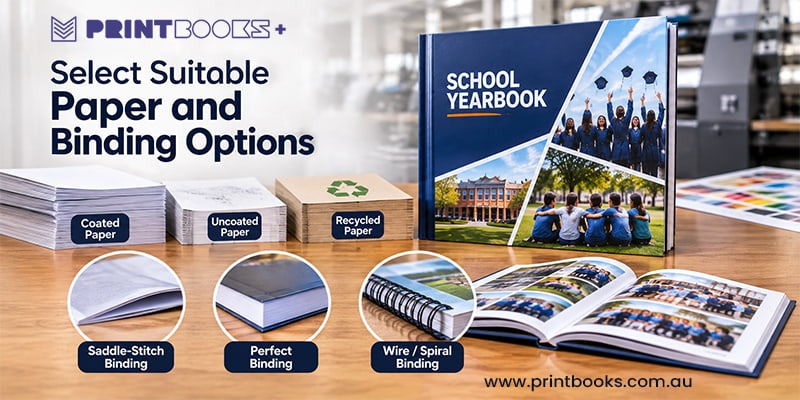
Coated paper has a smooth surface that works well for colour photographs and graphics. Uncoated paper has a more natural feel and may suit pages with written messages or student contributions. Recycled paper is another option for schools considering alternative paper stocks.
Paper weight also affects the finished publication. A heavier stock can give the cover a more substantial feel, while the internal pages need to suit the page count and overall thickness of the book.
The binding method should be considered alongside the number of pages.
Saddle-stitch binding uses staples through the centre fold. It is a practical choice for shorter yearbooks and allows the pages to open at the centre.
Perfect binding uses an adhesive spine to hold the pages together. It gives the yearbook a traditional book-style finish and can suit thicker publications.
Wire or spiral binding allows the pages to turn easily and the book to open flat. This can be useful when readers need to browse photographs or written content comfortably.
The right option depends on your yearbook’s page count, preferred appearance and budget. Discuss these details with your printer before finalising the artwork.
Design Pages That Are Easy to Read and Enjoy
A good school yearbook should feel consistent without making every page look the same. The design needs to bring the content together while allowing photographs and individual memories to stand out.
Start with a visual style that reflects the school. Colours, fonts and graphic elements can be used throughout the publication to create a recognisable look. The cover should also include the school name and academic year, giving the yearbook a clear identity.
Keep the page layouts organised. Use headings to separate classes and sections, and leave enough space around photographs and text. Avoid squeezing too many images onto a single page, as this can make the content difficult to follow.
Captions are especially useful for class photographs and school events. They help readers understand what they are looking at and make it easier to recognise people and occasions.
You can also make the yearbook more personal by including student messages, teacher reflections, memorable quotes and examples of student work. These details often become some of the most meaningful parts of the finished publication.
Prepare Artwork to Meet Printing Requirements
Once the content and design are complete, the next step is preparing the files for print. Artwork that looks fine on a computer screen may still have problems when it goes through production.
Use high-resolution photographs, ideally 300 dpi at their final print size, to help maintain image clarity. Print artwork should be prepared in CMYK colour mode, rather than relying on standard screen colours.
If photographs or background colours extend to the edge of a page, include the required bleed. Keep important text, student names and other details within the safety margins so they are not affected by trimming.
PrintBooks’ artwork guidelines specify print-ready PDF files, CMYK colour mode, 300 dpi images at 100% size, 3mm bleed and a 15mm safety margin. The files should also follow the page-order and cover setup requirements for the selected binding method.
Page count is another detail to confirm before exporting. Saddle-stitched books require the internal page count to be divisible by four, while perfect-bound and wire or spiral-bound books require an even number of internal pages.
If the cover needs a spine, its width must be confirmed with the printer once the final specifications are known. Checking these requirements before submitting the artwork can prevent avoidable corrections.
Review the Proof Before Approving the Print Run
Before the yearbook goes to print, take time to review the final proof. This is the opportunity to catch mistakes while they can still be corrected.
Check student names, class details, captions, dates and page numbers. Look closely at photographs to make sure faces have not been cropped awkwardly and important details are visible. Also review the cover, page order, margins and overall layout.
It helps to have another teacher or school representative review the publication. Someone who was not involved in the design may notice a spelling mistake, missing photograph or incorrect detail that others have overlooked.
Do not rush this stage. Once the full print run has been produced, correcting an error can be difficult and costly.
Plan the Printing Quantity, Budget and Delivery
The number of copies required will depend on the size of the school and how the yearbooks will be distributed. Start with the expected number of students, then account for teachers, staff, families and any additional copies the school wants to keep.
When requesting a yearbook printing quote, provide the printer with the approximate quantity, book size, page count, paper preference and binding option. These details help the printer understand the job and provide a more accurate estimate.
It is also important to work backwards from the planned distribution date. Allow enough time for content collection, design, artwork checks, proof approval, printing and delivery. This is particularly important when yearbooks need to be distributed before graduation or the end of the school year.
Bring Your School Yearbook Together with PrintBooks
A memorable school yearbook starts with the right planning. Organising content early, choosing a suitable format, selecting paper and binding, and preparing artwork correctly all help create a publication that students and families will enjoy revisiting.
At PrintBooks, schools can explore yearbook printing options alongside a range of book formats, paper stocks and binding choices. Whether you are preparing a short school publication or a more detailed yearbook, discussing your requirements with the printing team can help you work out the right specifications.
Planning a school yearbook? Contact PrintBooks to discuss your project, printing quantity and preferred format.